
Carista Review: What the EVO Scanner and PRO App Actually Do?
The short answer: Carista is a Bluetooth OBD2 scanner plus a phone app that lets you read fault codes, run service resets and switch on factory-hidden features without a dealer visit. The free app handles basic engine diagnostics. The real value sits behind the PRO subscription, which covers deep diagnostics, service tools and customizations. Carista is a strong buy if you own a supported VW Group car, BMW, Toyota or Lexus and want dealer-style tweaks without learning to code. It is a weak buy if your car is barely supported, or if you want manual long-coding like a professional tool.
If that sounds like you, the fastest route is the Carista store with code LEE15 for 15% off.
Carista at a Glance
| What it is | Bluetooth OBD2 adapter + Carista app (iOS and Android) |
|---|---|
| Hardware | Carista EVO (flagship) and Carista OBD Reader (budget) |
| Free app features | Read and clear standard OBD2 engine codes, basic live data, emissions readiness, ECU info, acceleration test |
| PRO app features | ABS/SRS/transmission/TPMS diagnostics, manufacturer codes, service resets, hidden-feature customizations, extended live data |
| Brands supported | 30+, deepest on VW Group, BMW/MINI, Toyota/Lexus |
| UK store prices (at time of writing) | OBD Reader £29.99 · EVO £49.99 · EVO + 12-month PRO £99.99 · PRO £14.99/month, £59.99/year, £99.99/2 years |
| Policies | 30-day money-back guarantee, free standard shipping, 2-year warranty on EVO |
Prices vary by region. In the US, the App Store lists PRO at $14.99 per month or $59.99 per year. Always check the price shown for your country at checkout.
How Carista Works
The setup is the least intimidating part of the whole experience, and it’s a big reason Carista sells to non-mechanics.
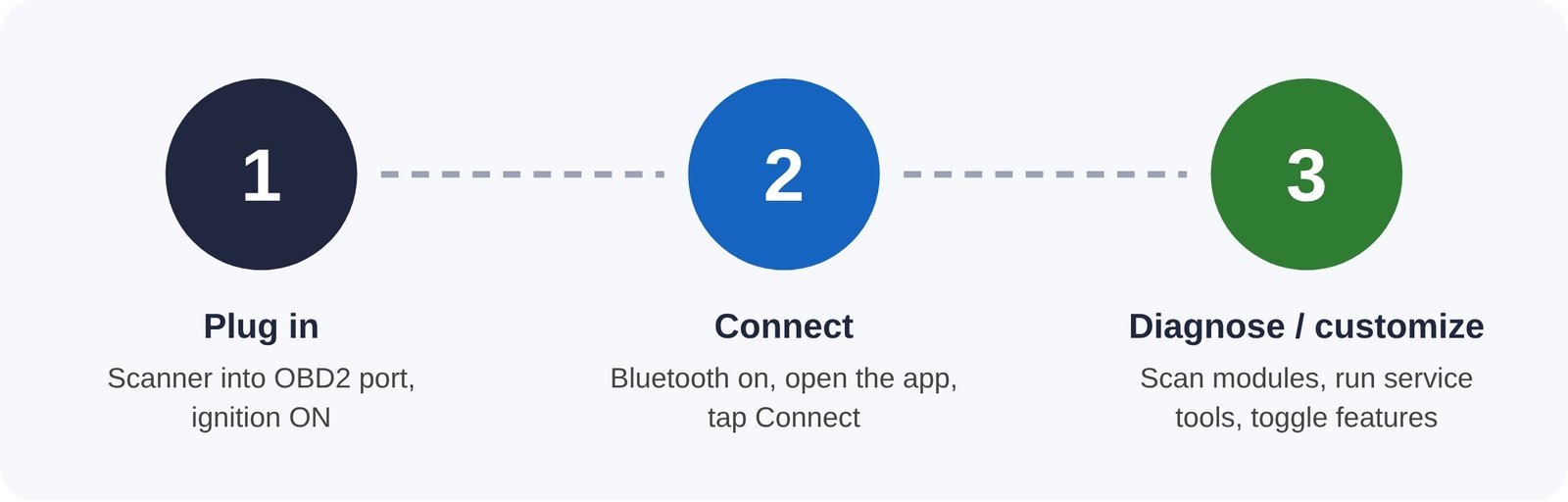
The whole setup takes a couple of minutes on a supported car.
Once connected, the app identifies your car and only shows features that apply to it. That last point matters. Carista doesn’t show you raw module addresses or hex values. Instead, you see plain-language settings, for example “Seatbelt warning chime: on/off”, with a toggle. That design makes it beginner-friendly. It also limits what an advanced user can do, which we’ll come back to.
Free App vs PRO: What You Actually Get
This is the question most buyers get wrong, so it’s worth being precise. Carista hardware is a one-off purchase. The app is free to download, but most of what you see in Carista’s marketing requires PRO.
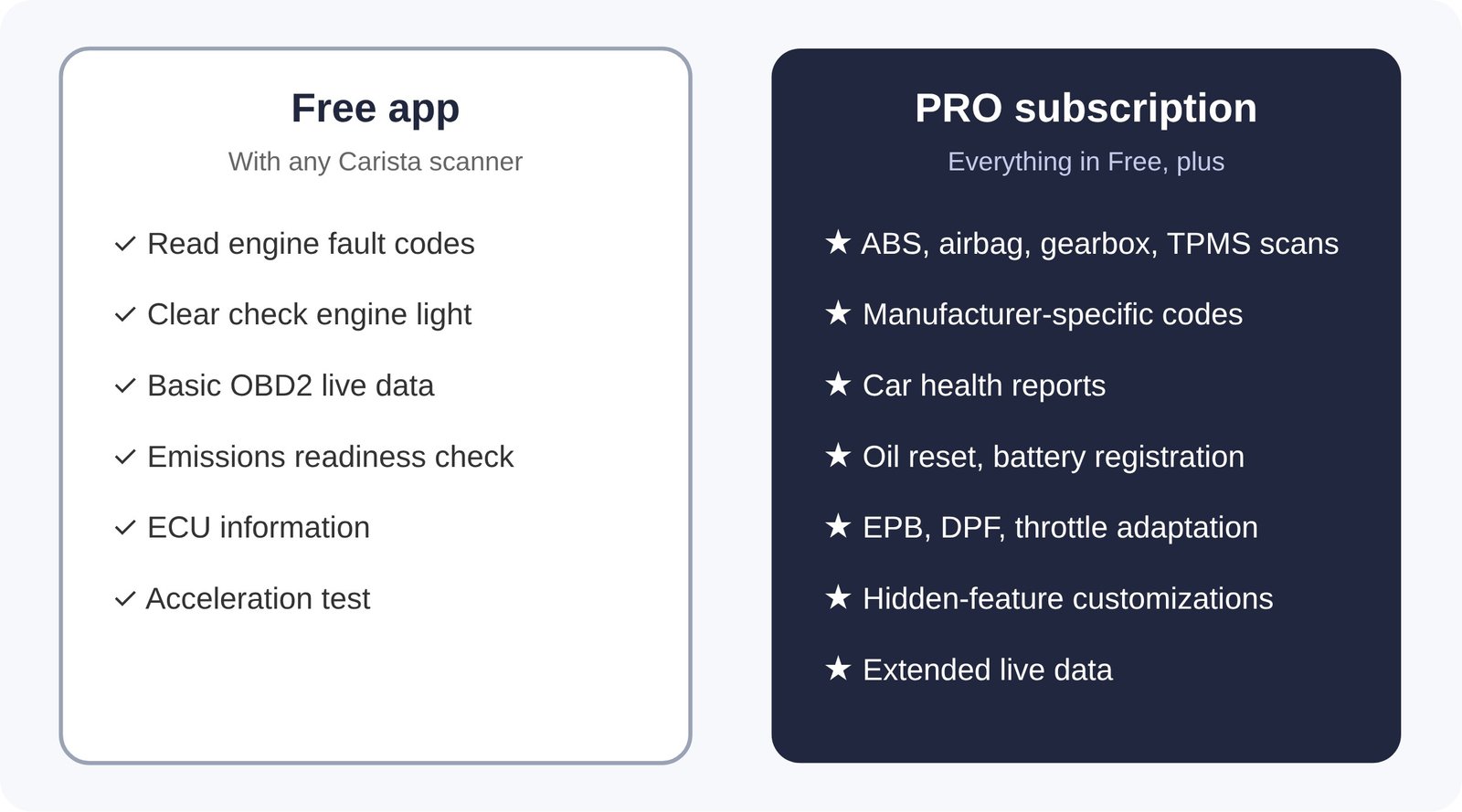
Two details work in the buyer’s favour:
- Changes stay after you cancel. Carista states that customizations applied while subscribed remain in the car after the subscription ends. Many owners buy a single month, make their changes, run any service resets, and then cancel.
- No per-change fees. Unlike credit-based rivals, a PRO subscription lets you apply, change and undo customizations as often as you like.
That single-month strategy makes the true cost much lower than “£59.99 a year” suggests, for owners who only want a one-time set of tweaks. You can see the monthly and yearly PRO plans here, and LEE15 applies at checkout.
What Can Carista Customize? Real Examples
“Hidden features” sounds vague until you see the kind of settings involved. Exact options depend heavily on make, model, year and installed equipment. These are typical examples Carista lists or that owners commonly mention:
| Category | Typical options |
|---|---|
| Comfort and annoyances | Disable the seatbelt chime, turn off start-stop memory, stop the “fake” engine sound on some models |
| Lighting | Daytime running lights on/off, cornering lights, welcome/leaving-home lights, coming-home duration |
| Locks and mirrors | Auto-fold mirrors when locking, comfort open/close windows with the key fob, auto-lock at speed |
| Display and alerts | Hide or show instrument cluster items, change warning behaviour |
| Wipers and washers | Rain-sensor behaviour, rear wiper with reverse gear |
Before buying, use Carista’s supported-cars page to look up your exact model. It lists the specific customizations, diagnostics and service tools available for your car, which is far more useful than any review. A Skoda or Audi may show dozens of options, while another brand may show only a few.
EVO vs OBD Reader: Which Scanner Should You Buy?
Carista sells two adapters. Both use the same app and the same PRO subscription. They differ in coverage, speed and convenience.
| Feature | Carista OBD Reader | Carista EVO |
|---|---|---|
| UK price (time of writing) | £29.99 | £49.99 |
| Brand coverage | Core brands: Audi, BMW, Cupra, Infiniti, Lexus, MINI, Nissan, Scion, SEAT, Skoda, Toyota, VW | Adds Ford, Land Rover, Mazda, Volvo and more, plus licensed diagnostics on select GM, Hyundai, Kia, Renault and others |
| Model years | Mainly up to 2019 | Older and newer models |
| Vehicle protocols | HS-CAN | HS-CAN plus MS-CAN (Ford, Mazda), SW-CAN (GM), K-Line (older BMW) |
| Bluetooth / processor | Bluetooth 5.0 | Bluetooth 5.1, 32-bit ARM |
| Leave plugged in? | No, unplug after use | Yes, low-power sleep mode |
| Warranty | Standard | 2 years |
Our recommendation: Choose the EVO unless you have an older car from one of the core brands and know you’ll only use the tool occasionally. The protocol support is the deciding factor for Ford, Mazda, GM and older BMW owners, because some of their modules simply can’t be reached without it. The sleep mode also means you can leave the EVO in place and use it like a built-in feature.
For most buyers, the best value is the EVO + 12-month PRO bundle. In the UK store, it costs £99.99, about £10 less than buying the EVO (£49.99) and a 12-month PRO plan (£59.99) separately. LEE15 takes a further 15% off.
What It Really Costs Over Time
Subscription pricing makes Carista look more expensive or cheaper than it is, depending on how you use it. Here are three realistic owner profiles, using UK list prices at the time of writing and before the LEE15 discount:
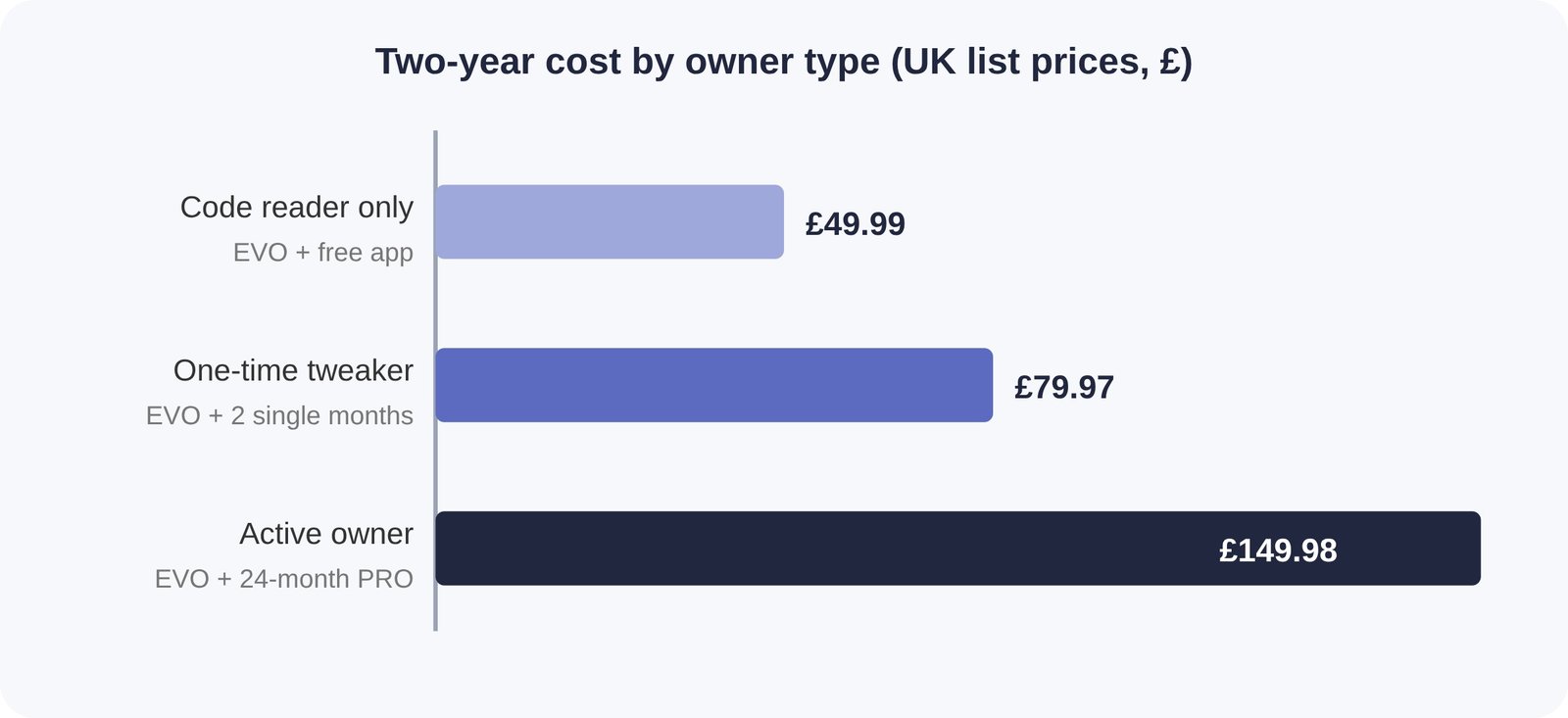
- Code reader only: If you just want to read and clear engine codes, the free app plus a scanner is a one-time cost with no subscription.
- One-time tweaker: Buy one PRO month to apply customizations and run a service reset, then another month next year when the next service is due.
- Active owner: If you have several cars, change settings often or rely on service tools, a multi-year plan is cheapest per month.
For context, many dealerships charge a diagnostic or labour fee just to connect a car, and a service-light reset or battery registration can cost more than a year of PRO. Carista itself frames the app as an alternative to paying up to around $300 at a service center. That figure is the brand’s own, and real shop prices vary hugely by region.
Carista vs a Cheap Generic ELM327 Adapter
You can buy a no-name ELM327 Bluetooth dongle for the price of a takeaway, so why pay more? The cheap adapter plus a free generic app will read and clear standard engine codes, and for that single job it works. The gap shows up everywhere else:
- Module access. Generic apps talk to the engine computer only. They can’t read ABS, airbag, gearbox or body modules, which is where most dashboard warnings beyond the engine light live.
- Service tools and customizations. Oil-service resets, battery registration, parking-brake service and hidden features all need brand-specific software that generic apps don’t have.
- Reliability. Many ultra-cheap dongles are clones with unstable firmware. Carista itself warns that its app only works properly with genuine adapters, and drops and failed connections are a common complaint with fakes.
- Battery drain. Cheap adapters rarely have a proper sleep mode, so leaving one plugged in can slowly flatten a battery. The EVO is designed to stay connected.
If all you ever want is to read an engine code once a year, a generic dongle will do. If you want anything beyond that, the generic route quickly becomes a dead end.
Where Carista Is Strongest
- VW Group owners (VW, Audi, Skoda, SEAT, Cupra). Carista calls itself an official VW Group partner. It handles SFD, the security gateway VW uses to lock modules, on models up to 2023, and announced SFD2 customization support for newer models in 2026. Check your exact car for the current status.
- Toyota and Lexus. Owner forums for models like the 4Runner and Tacoma often recommend Carista for customization, and Carista added a hybrid battery health check for Toyota hybrids.
- BMW and MINI. Support is deep, and the EVO’s K-Line protocol covers older BMW models.
- iPhone users. The app works on both iOS and Android, which historically gave it an edge over rivals that started on Android only.
- Multi-car households. One PRO subscription covers all your vehicles.
- Third-party apps. The EVO also works with other OBD2 apps, for example specialist EV apps, so the hardware isn’t locked to Carista.
Where Carista Falls Short
An honest review has to cover the limits, because they’re the reason some buyers return it.
- No manual long-coding or adaptations. Carista offers pre-defined options, not raw access. VW enthusiasts who follow forum guides to change specific coding bytes will find tools like OBDeleven or VCDS more capable. We compare them in detail in our Carista vs OBDeleven guide.
- Coverage varies a lot by brand. A reviewer on Carista’s own store noted it was excellent on a Skoda but of little use on their Volvo. If your car shows only a handful of features on the supported-cars page, PRO may not be worth it.
- The headline features need PRO. Expect to pay a subscription for ABS, airbag, service tools and customizations.
- No bi-directional tests. Carista doesn’t run the active component tests that professional scan tools offer, such as cycling an ABS pump or a fan.
- Region-specific limits. Some features differ between European and US models, and Opel/Vauxhall support after 2017 isn’t guaranteed.
None of these is a problem if you’re a typical owner who wants simple diagnostics and a few comfort tweaks. They do matter if you’re an enthusiast who wants to go deep.
Is Carista Safe for Your Car and Warranty?
Two worries come up repeatedly.
Can it damage my car? Carista only changes settings the manufacturer already built into the car’s modules, and it describes every customization as fully reversible from within the app. Risk is low on supported cars, but follow the basics. Keep the battery healthy, don’t change settings while driving, and don’t interrupt the app mid-change.
Will it void my warranty? Reading codes and running service resets don’t modify anything. For customizations, Carista describes its changes as reversible and warranty-safe. Warranty decisions ultimately rest with your dealer and manufacturer, though, so if you’re worried, revert customizations before a warranty visit. That takes a few taps.
What Owners Say
Carista reports more than 3 million app downloads and a 4.9/5 average from more than 8,300 customer ratings on its store. The EVO itself shows 4.71 from 156 reviews at the time of writing. Brand-hosted ratings are naturally favourable, so look at the patterns rather than the score:
- Praised: quick pairing, an easy interface for non-mechanics, and dealer-only settings changed at home. Several owners renew PRO for a second year.
- Criticized: limited features on some brands and newer VW models before SFD2 support arrived. One reviewer upgraded their rating once that support was added.
On enthusiast forums, the consensus is consistent. Carista is the easier, broader tool for everyday owners, while OBDeleven and VCDS win for deep VAG coding.
Who Should Buy Carista, and Who Shouldn’t
| Buy Carista if you… | Look elsewhere if you… |
|---|---|
| Drive a well-supported car (check the list first) | Drive a brand with few listed features |
| Want plain-language toggles, not coding | Want manual long-coding and adaptations |
| Do your own oil services and battery swaps | Need bi-directional tests for repair work |
| Use an iPhone or have several cars | Refuse any subscription at all |
| Want a one-month plan for one-off jobs | Only need generic codes once a year (the free app may be enough) |
How to Buy Carista With 15% Off
- Check your car on Carista’s supported-cars page.
- Go to the Carista store through this link.
- Pick the EVO bundle, the EVO alone, the OBD Reader, or a PRO plan if you already own a scanner.
- Enter code LEE15 at checkout and confirm the 15% discount.
- If Carista is running its own promotion, compare totals and use whichever is lower.
You’re covered by a 30-day money-back guarantee. That gives you time to plug it in, see exactly which features your car supports, and return it if the list is too short.