
How to Reset the Check Engine Light?
The fastest way to reset a check engine light is to plug a Bluetooth OBD2 scanner into the port under your dashboard, read the trouble code on your phone, fix what caused it, and then tap Clear codes. The whole process takes about five minutes once you have the tool. Disconnecting the battery or waiting it out can also turn the light off, but both methods come with side effects most guides skip.
The bigger question is whether you should reset it right now. Clearing the light without knowing why it came on is like silencing a smoke alarm without checking the kitchen. This guide walks you through how to make that call, then shows each reset method, what it actually does to your car’s computer, and how to avoid failing an emissions test because of a reset done at the wrong time.
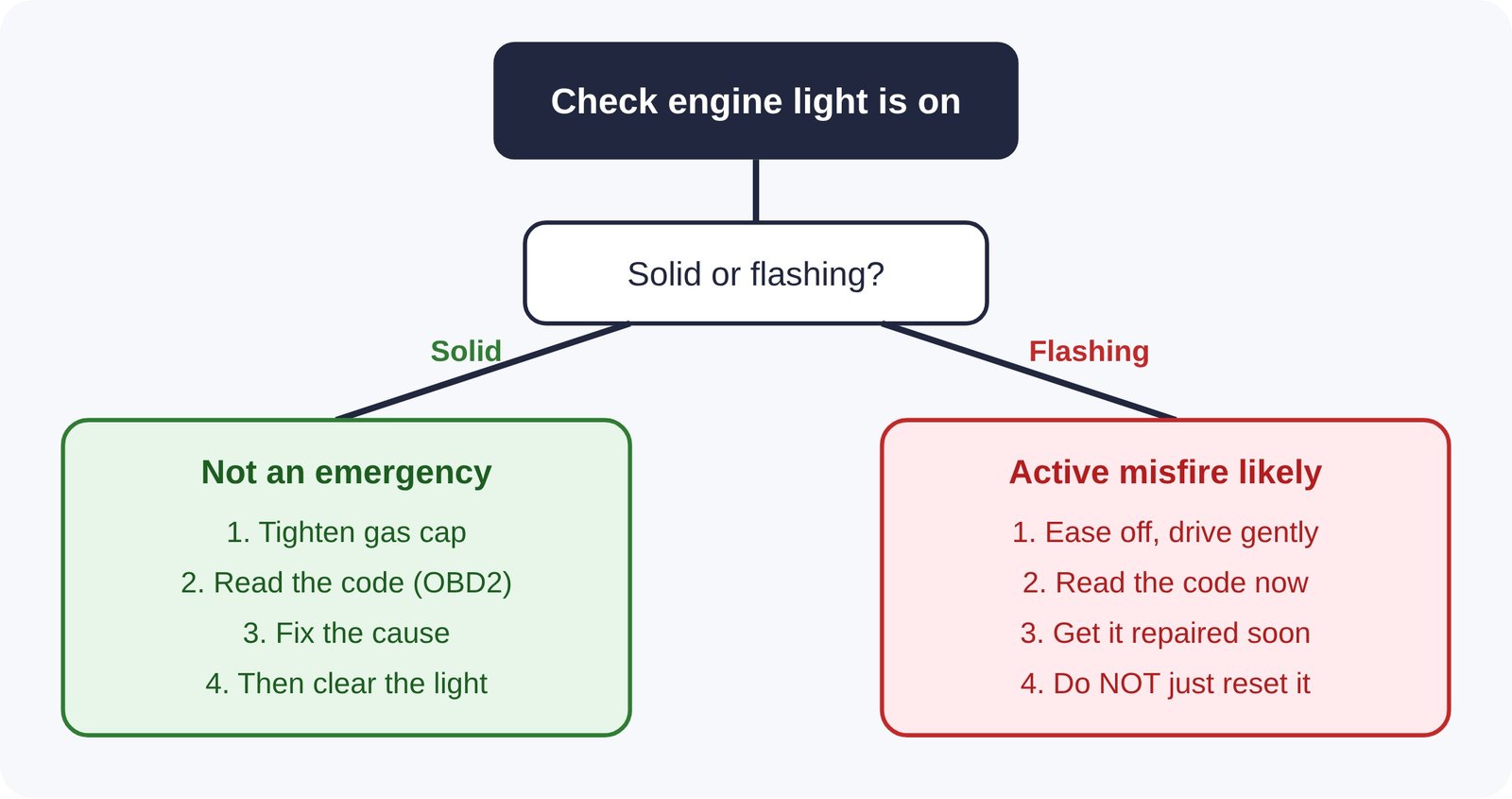
Step Zero: Is the Light Solid or Flashing?
Before you touch anything, look at how the light behaves. This one detail tells you more than any article can.
- Solid (steady) light: The engine computer has logged a fault that affects emissions or engine management, but it isn’t an emergency. Common causes are a loose gas cap, an aging oxygen sensor or a small vacuum leak. You can usually keep driving normally and investigate within a few days.
- Flashing light: This almost always means an active, severe misfire. Unburned fuel is being dumped into the exhaust, where it can overheat the catalytic converter quickly. Slow down, avoid hard acceleration and get the car checked as soon as possible. Do not reset a flashing light and keep driving.
- Light plus other symptoms: If you also notice overheating, a red oil-pressure warning, smoke, or a big loss of power, stop driving. Those warnings matter more than the check engine light itself.
Whichever case you’re in, reading the stored code is the next step. A basic scanner such as the Carista OBD2 scanner reads standard engine codes for free in its app, and code LEE15 takes 15% off.
What the Check Engine Light Is Really Telling You
Every car sold in the US since 1996, and petrol cars in Europe since 2001, uses a standardized onboard diagnostics system called OBD-II (EOBD in Europe). The engine computer constantly checks sensor readings against expected ranges. When something stays outside that range long enough, it stores a diagnostic trouble code (DTC) and turns on the light.
That code is the whole point. The light itself only says “something is wrong.” The code says what is wrong and roughly where. Here is how to read one:
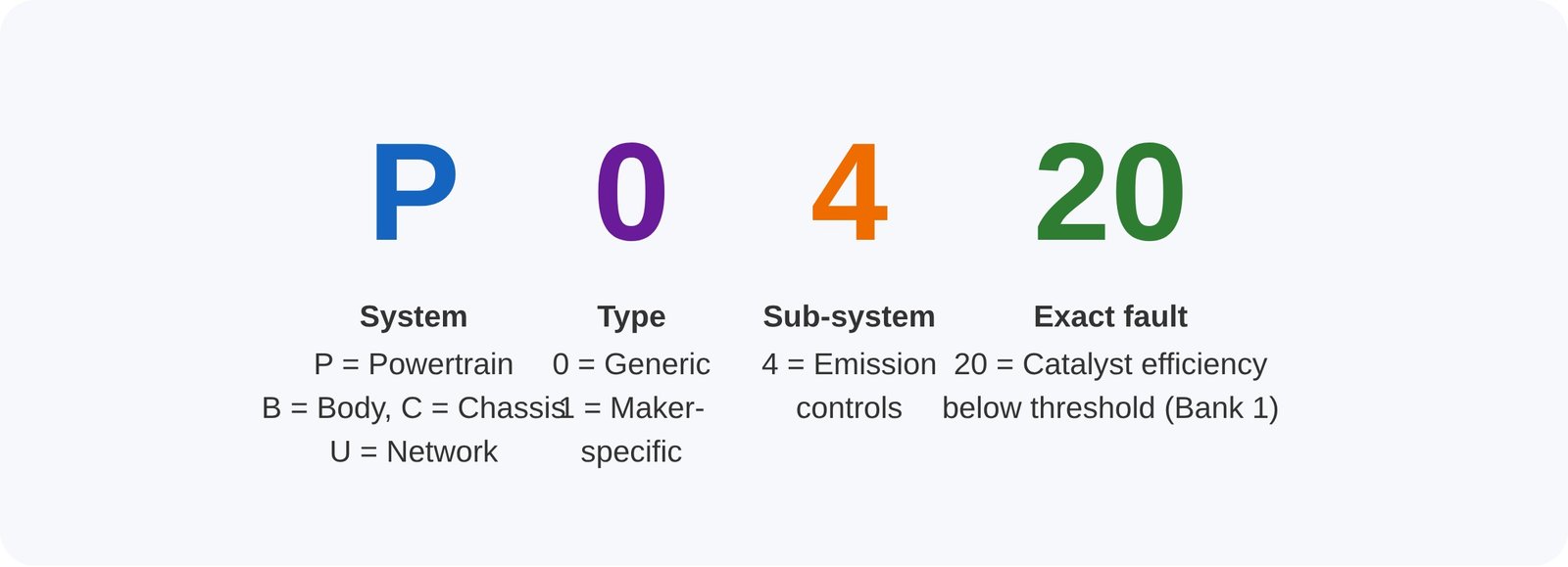
Generic codes (P0xxx) mean the same thing on every car. Manufacturer-specific codes (P1xxx and most B, C and U codes) only make sense with brand-specific software. That distinction matters later when you choose a tool.
The codes you are most likely to see
| Code | What it usually means | Typical first check |
|---|---|---|
| P0455 / P0456 / P0457 | Evaporative (EVAP) system leak | Gas cap seal, cap not clicked shut |
| P0171 / P0174 | Engine running lean | Vacuum leak, dirty mass airflow sensor |
| P0300–P0306 | Random or cylinder-specific misfire | Spark plugs, ignition coils |
| P0420 / P0430 | Catalytic converter efficiency low | Oxygen sensors first, then the converter |
| P0135 / P0141 | Oxygen sensor heater circuit | Sensor or wiring |
| P0128 | Coolant below expected temperature | Thermostat stuck open |
A code points you toward a system, not always the exact failed part. P0420, for example, often turns out to be a lazy oxygen sensor rather than a dead catalytic converter. Checking the cheaper part first can save a lot of money.
Where Is the OBD2 Port?
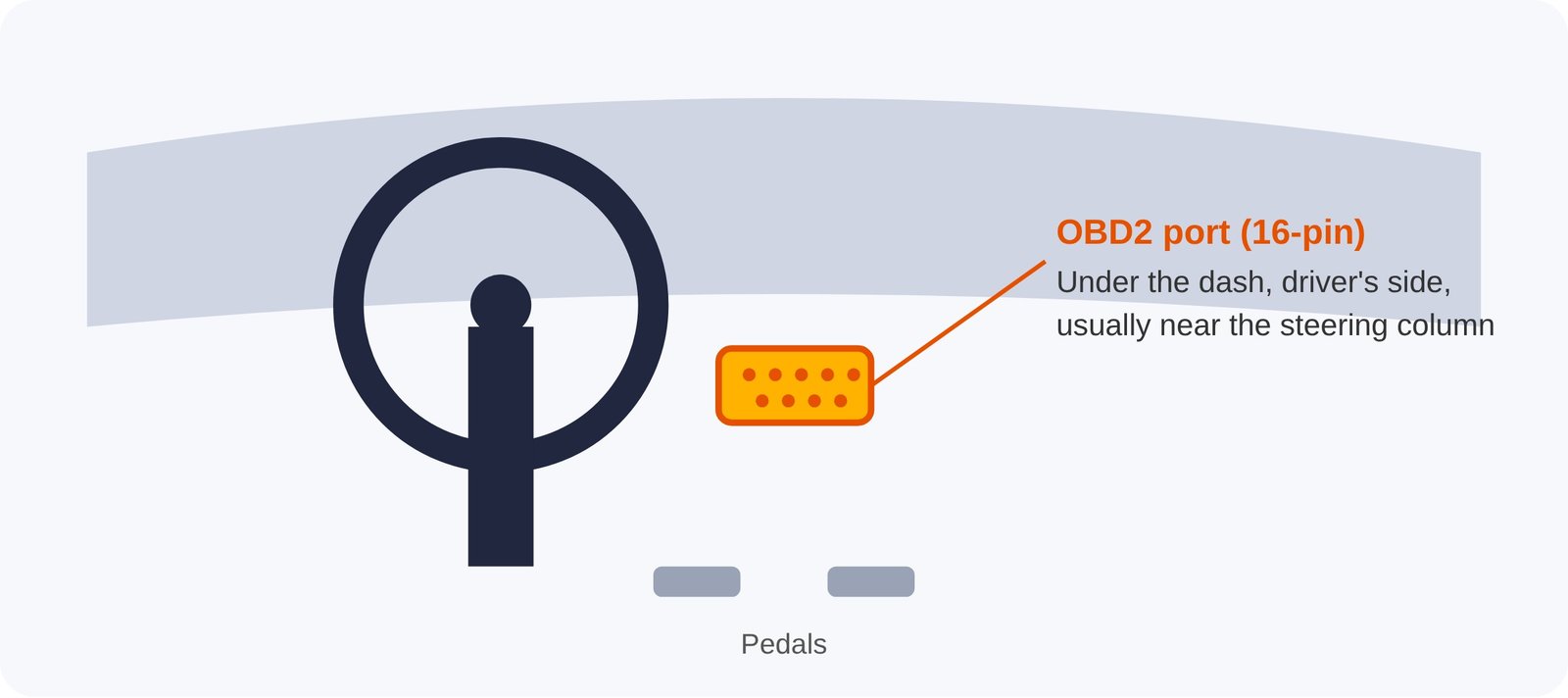
On almost every car, the 16-pin OBD2 socket sits on the driver’s side, under the dashboard, within about 2 feet (60 cm) of the steering column. It’s often just above the pedals or behind a small flip-down cover. On some Audi, BMW and Toyota models it hides behind a panel near the fuse box or the left knee area.
Method 1: Read and Clear the Code With an OBD2 Scanner and Your Phone (Recommended)
This is the only method that tells you why the light came on before you turn it off. A Bluetooth scanner plus a phone app has replaced the clunky handheld code readers of a decade ago, and for basic engine codes it costs less than a single garage diagnostic fee.
Here is the exact process using the Carista app as the example. Other apps follow a similar flow.
- Plug the scanner into the OBD2 port with the car off.
- Turn the ignition to ON. You don’t need the engine running for most scans.
- Open the app, turn on Bluetooth and tap Connect. The app identifies your car automatically on supported models.
- Run a scan and write down every code. Note whether each one is marked as current, pending or stored. Screenshot the freeze-frame data if the app shows it. That snapshot records engine speed, temperature and load at the moment the fault happened, and it’s gold for a mechanic.
- Look up what the code means. Carista explains codes in plain language, including a newer AI-based explanation feature, so you don’t have to dig through forums.
- Fix the cause, or at least decide it’s safe to monitor, such as after tightening a loose gas cap.
- Tap Clear codes. The light goes out immediately.
- Drive normally for a few days and rescan. If the code doesn’t return, the fix worked.
With Carista, reading and clearing standard OBD2 engine codes is free, along with basic live data and an emissions-readiness check. You only pay for the PRO subscription if you also want to scan the ABS, airbag (SRS), transmission and tyre-pressure (TPMS) modules, read manufacturer-specific codes, or run service resets.
If you don’t have a scanner yet, the Carista EVO and OBD Reader both work with the free app. Use code LEE15 at checkout for 15% off.
Method 2: Let the Car Clear It Itself
If the cause was temporary, such as a gas cap left loose after refuelling, the engine computer will often turn the light off on its own. It does this once the related self-test passes on several consecutive drive cycles, which usually means a few days of normal driving. The stored code may remain in memory as “history” for longer.
When this works: genuinely one-off events, like a loose cap, a single bad tank of fuel or a brief sensor glitch.
When it doesn’t: anything that is still wrong. The light will simply stay on. Waiting also means driving blind, because without reading the code you don’t know whether you’re dealing with a gas cap or the early stage of a misfire.
A good compromise: Tighten the cap, read the code so you know what you’re dealing with, and only then give it a few days to clear itself.
Method 3: Disconnect the Battery (Use With Caution)
Disconnecting the negative battery terminal for 15 to 30 minutes cuts power to the engine computer and usually wipes its stored codes. This turns the light off, but it is a blunt tool with real side effects:
- It erases the evidence. The code and the freeze-frame data disappear, so neither you nor a mechanic can see what happened.
- It resets learned settings. The engine and transmission lose adaptive memory, including fuel trims, idle speed and shift patterns. The car may idle unevenly or shift oddly for a while as it relearns.
- It can trigger new chores. Depending on the car, you may need to re-enter a radio security code, re-initialize power windows and the sunroof, or reset the clock. Many modern cars also need battery registration after battery work.
- It resets the emissions readiness monitors. More on why that matters below.
- The light comes back if the fault is still present, often within a day or two.
On many newer cars with complex electronics, a scanner is simply the safer option. It clears the codes without cutting power to dozens of control modules at once.
Method 4: Free Code Reading at an Auto Parts Store
In the US, many large auto parts chains will read your codes for free in the parking lot. It’s a useful option if you need a one-off answer today. The catch is that they usually read only generic engine codes, they may not clear them, and you’ll be back the next time the light appears. If you drive an older car or own more than one vehicle, a scanner pays for itself quickly.
Reset Methods Compared
| Method | Shows the cause? | Speed | Side effects | Best for |
|---|---|---|---|---|
| OBD2 scanner + app | Yes, code + freeze frame | Instant | Resets readiness monitors | Everyone, especially repeat issues |
| Let it self-clear | No | Days | None, but you drive blind | Confirmed one-off causes |
| Battery disconnect | No, erases data | 15–30 min | Lost settings, relearn, readiness reset | Last resort on older cars |
| Parts store scan | Yes, generic codes only | Same day | Usually no clearing | One-off emergencies |
The Emissions Test Trap Nobody Mentions
This is the most common way a well-meant reset backfires. When you clear codes, either with a scanner or by disconnecting the battery, the car also resets its readiness monitors. These are internal self-tests for the catalytic converter, oxygen sensors, EVAP system and other components. Each one needs specific driving conditions, such as a cold start, steady highway speed and idling, before it reports “ready” again.
Most US emissions and smog programs reject a car if too many monitors show “not ready,” even with no warning light on. Ohio’s E-Check program, for example, explains that clearing codes turns the light off but leaves the monitors incomplete until the car completes its drive cycle (Ohio EPA readiness fact sheet). In practice, that often means 50 to 100 miles of mixed driving over several days.
What to do:
- Never clear codes in the days right before an inspection.
- After a repair and reset, drive normally for a week, mixing city and highway.
- Check readiness before you go. Carista’s free app shows emissions-readiness status, so you can confirm every monitor reads “ready” instead of guessing.
The same logic protects you when buying a used car. A seller can clear codes minutes before you arrive. If a scanner shows several monitors “not ready” on a car that supposedly has no problems, ask why. That check takes two minutes with a phone-based OBD2 scanner, and LEE15 cuts the price by 15%.
Why the Light Came Back After You Reset It
A returning light is not a malfunction. It’s the system doing its job. OBD-II stores faults in three states:
- Pending: A fault was seen once. If it repeats on the next drive cycle, it becomes confirmed and the light turns on.
- Confirmed (stored): The fault repeated, and the light is on. This is what you clear.
- Permanent: On newer vehicles, certain emissions codes can’t be erased with a scanner at all. They disappear only after the car itself verifies the repair through its self-tests. This exists specifically to stop people from clearing codes to pass inspections.
If the same code returns within a few days, the original cause wasn’t fixed, or the part you replaced wasn’t the real culprit. A different code may mean the first fault caused a knock-on problem. Either way, rescan and compare.
Beyond the Engine: Other Warning Lights a Basic Reader Can’t Touch
Here’s where many drivers get stuck. A generic OBD2 reader talks only to the engine computer. Modern cars have dozens of other modules, and their warning lights don’t respond to generic tools:
- ABS and traction control warnings
- Airbag (SRS) light
- Tyre pressure (TPMS) faults
- Transmission warnings
- Service reminders, such as oil-change intervals and inspection due
- Electronic parking brake, which must be retracted to change rear pads on many cars
- Battery registration after fitting a new battery, required on many BMW, VW and Audi models
Reading and resetting these needs brand-specific software. This is where the paid tier of an app like Carista earns its keep. Carista PRO adds advanced diagnostics for ABS, SRS, transmission and TPMS, manufacturer-specific codes, and service tools such as oil-service reset, battery registration, electronic parking brake service and DPF regeneration on supported cars. A single dealer visit for a service-light reset or battery registration can cost more than a year of the subscription. Carista sells PRO monthly or yearly, so you can buy one month when you need it.
Compatibility varies by brand, model and year, so check your car on Carista’s supported-cars page before buying. Carista is strongest on VW Group cars (VW, Audi, Skoda, SEAT, Cupra), BMW, Toyota and Lexus, with growing support for Ford, GM, Hyundai, Kia and others.
Which Scanner Should You Buy?
For most drivers, the choice comes down to what you want to do beyond reading engine codes.
| If you want to… | What you need |
|---|---|
| Read and clear engine codes, check emissions readiness | Any Carista scanner + the free app |
| Diagnose ABS, airbag, TPMS, transmission | Carista scanner + PRO (monthly or yearly) |
| Do service resets, battery registration, EPB, DPF | Carista scanner + PRO |
| Unlock hidden features (auto-fold mirrors, seatbelt chime, lights) | Carista scanner + PRO |
| Leave the scanner plugged in permanently | Carista EVO (has a low-power sleep mode) |
The Carista OBD Reader is the budget option. It covers core brands, mainly on models up to 2019. The Carista EVO supports more brands and vehicle protocols, connects faster, comes with a 2-year warranty and can safely stay plugged in. In the UK store, the EVO is listed at £49.99 on its own and £99.99 bundled with 12 months of PRO at the time of writing. Prices vary by region, and every order has a 30-day money-back guarantee.
Get 15% off Carista with code LEE15
The Short Version
Check whether the light is solid or flashing. Read the code before you clear it. Fix the cause, then clear the light with a scanner rather than the battery, and don’t do it right before an emissions test. Keep a cheap Bluetooth scanner in the glovebox, and you’ll never again have to guess what that orange engine symbol means.
Ready to stop guessing? Shop Carista scanners here and enter LEE15 for 15% off your order.
This guide is for general information. Vehicle systems vary by make, model and year. If you’re unsure about a repair, or the light is flashing, have the car inspected by a qualified technician.