Pocket AI Review (2026): I Use It Every Day. Here’s Why I Recommend It
Pocket AI at a glance
- Unlimited transcription and summaries, free for life
- Paired in under a minute, worked first time
- Two real recording modes: in-person conversations and phone calls
- Tasks and mind maps generated automatically
- You can choose which AI model writes your summaries
Is Pocket right for you?
- Lots of in-person meetings: put it on the table, press once, and walk out with minutes, decisions and tasks.
- Always on the phone: it captures both sides of a call through the back of your phone, without speakerphone.
- Ideas come on the move: press and talk while walking; your thoughts come back filed and structured.
- Students and trainees: lectures and interviews become summaries and mind maps you can revise from.
Why I chose Pocket
I hesitated for a long time between several AI voice recorders and seriously considered the Plaud Note Pro. What tipped it for me was simple: most recorders sell you the device and then lock the AI behind a monthly plan. Pocket gives you unlimited recording, transcription and summaries for free, for life.
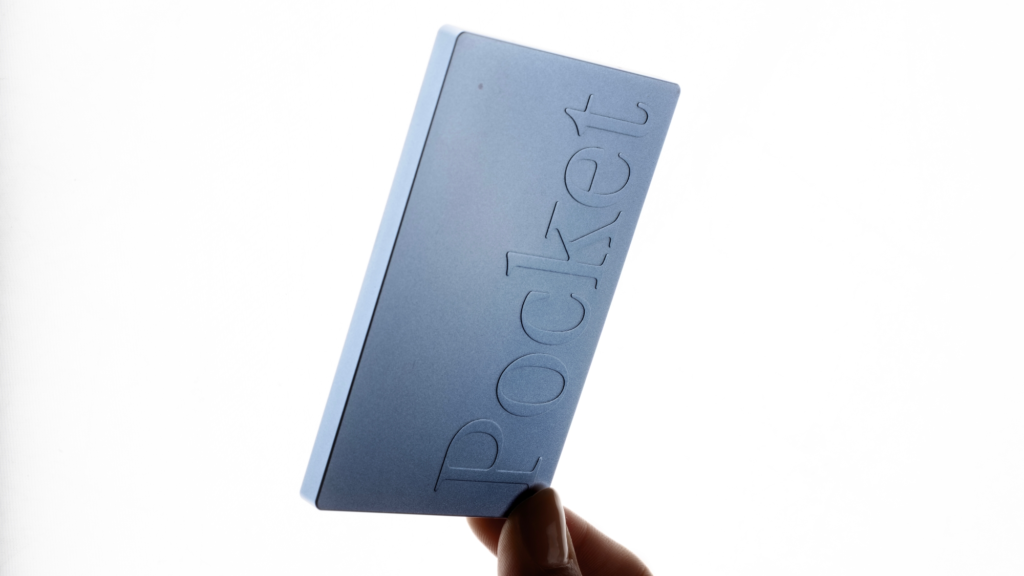
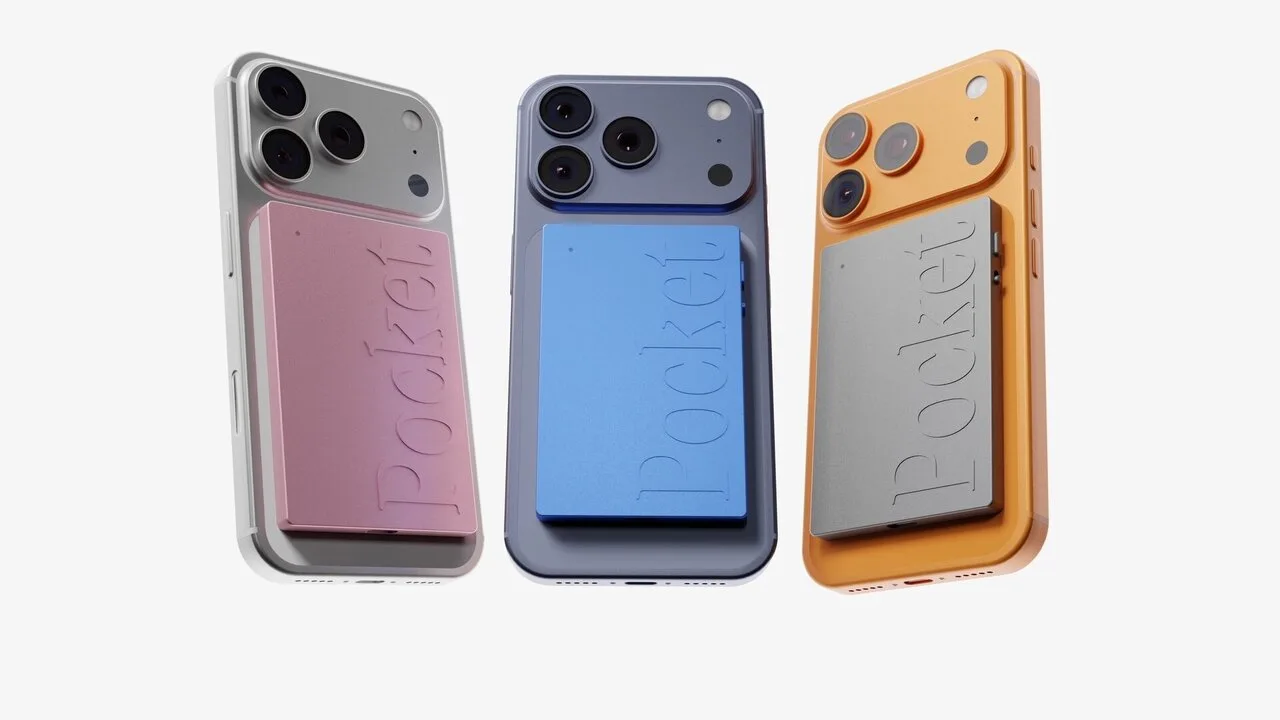
Pocket is a card-sized device (a little thicker than a credit card) designed in San Francisco by Open Vision Engineering, a Y Combinator company. It snaps onto the back of your phone with MagSafe and records without you unlocking your screen or opening an app. I felt that difference from the very first day: I stay present in the conversation instead of managing my phone.
First days: setup and design
Setup was the easiest I’ve had with any gadget: download the app, pair the device, done in under a minute. It worked first time.
I went for the blue one and really like how it looks. An adapter is included in the box for phones without MagSafe, but I ordered a magnetic phone case and Pocket stays perfectly in place. Since it’s always attached, I simply have it with me everywhere.
The two recording modes
Everything starts with one side button. Press once and Pocket starts recording, confirmed by a light and a small vibration. Press again to stop. No screen, no menu. It records to its 64GB onboard storage even without internet, then syncs when you open the app. On a plane or somewhere with no signal, nothing gets lost.
Normal mode: in-person conversations
This is the default. Two studio microphones pick up everything around you, with speakers separated, at up to 15 metres in a quiet room. I put it on the meeting table, press, and take part as usual.
Call mode: phone calls
This is the cleverest feature. A third “contact” microphone, sitting on the back of your phone, captures both sides of a call through the phone’s vibrations, without using the speaker. It’s completely discreet, and the accuracy honestly blew me away.
Syncing
You can sync over Bluetooth or use “Fast transfer” over Wi-Fi for long recordings. Each conversation shows up with its time, duration and a “Synced” status.
What Pocket turns one conversation into
This is the heart of the product and the main reason I recommend it. Every synced recording becomes five things you can actually use. The home screen keeps everything sorted by date, with folders and tags (I keep work and personal notes separate).
1. Audio and transcript
The audio is kept, with a built-in player. The transcript is timestamped, searchable and split by speaker. You can name each speaker, search for a word and jump to the exact moment. Finding “who said what” takes seconds.
2. The summary
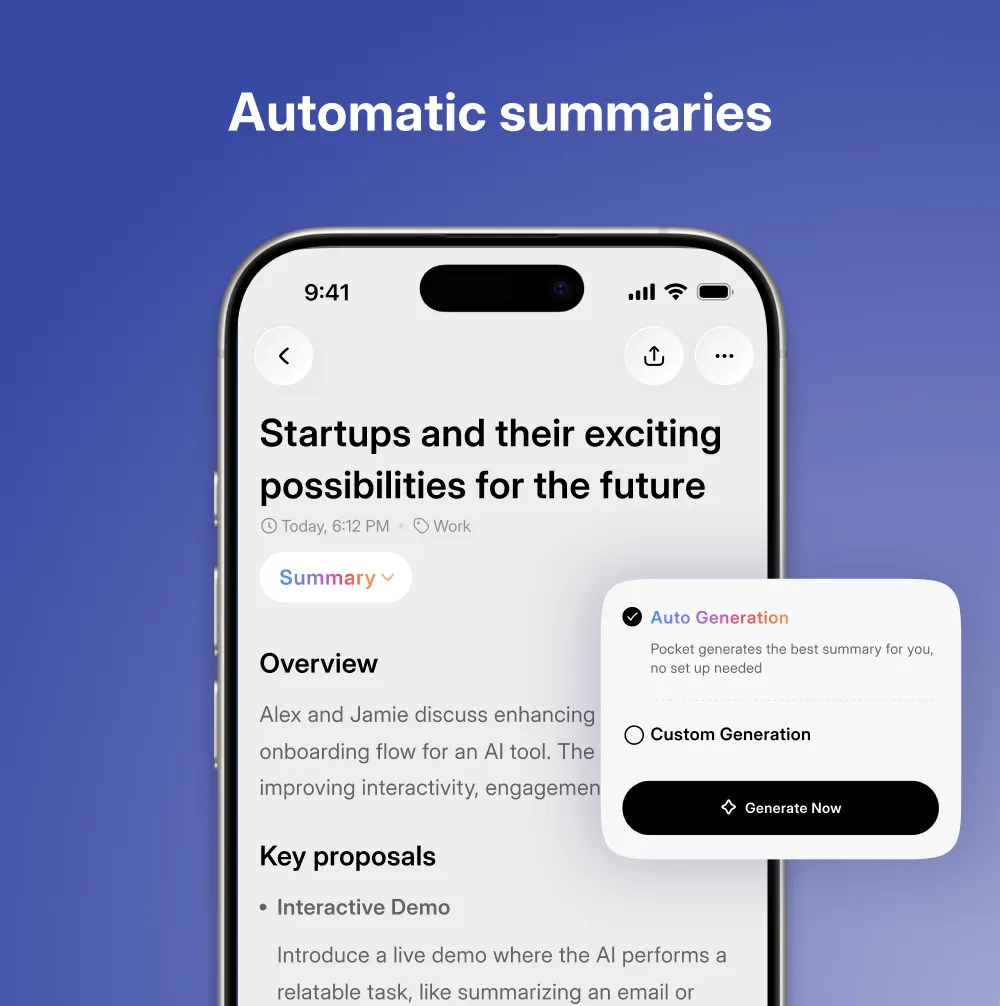
Key points in seconds, with headings and bullets. If a summary isn’t quite right, you can regenerate it or rewrite it with the AI, changing the style or tone.
3. The action plan (my favourite)
Pocket pulls out every task mentioned in a conversation and collects them in a “My tasks” tab. After a discussion, my to-dos are already listed: organise the move, finalise a registration, prepare a meeting. Nothing slips between two conversations anymore.
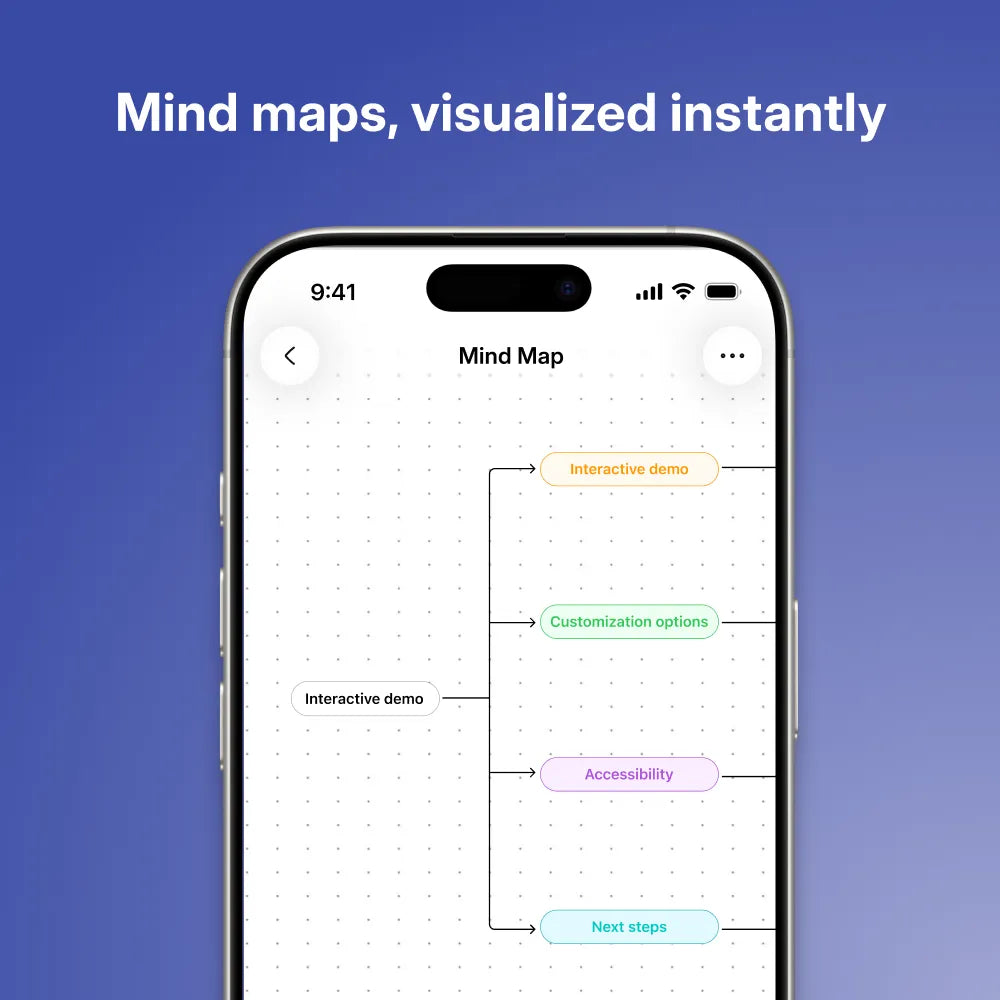
4. The mind map
For complex discussions, Pocket builds a mind map of themes and sub-branches. You see the structure, priorities and links at a glance, which says far more than a wall of text.
5. Ask Pocket
Ask a question across all your conversations: “Summarise the key decisions from recent meetings”, “List the action items assigned to me”, “What were the main topics this week?”. It’s like a search engine over your own working life.
A rare level of customisation
Few reviews mention this, but it makes a real difference day to day: you don’t just accept what the AI gives you, you steer it.
- Choose the AI model. Pick which model writes your summaries (for example Gemini, GPT-5 or Claude, depending on updates), trading speed for depth.
- Choose the summary style. “Themes” such as a dictation format decide how information is structured. Pro unlocks 100+ styles.
- Summaries straight to your inbox. Turn on auto-summary plus “Send summaries to email” and it’s fully hands-free: you talk, the summary lands in your inbox.
- And more: a custom word dictionary for jargon and names, speaker management, calendar matching, time zone, app language, and workflows to your other apps.
This is what turns Pocket from a voice recorder into a genuinely personal assistant.
How I use Pocket every day
Work meetings
My number-one use. Pocket goes on the table, I press, and I take part without stress. Afterwards I have the minutes, the decisions and who does what. No more “did anyone take notes?”. I’ve stopped writing minutes by hand: I reread the summary, tweak a couple of words and send it. That saves me hours every week.
Important phone calls
An admin appointment, a negotiation, complicated instructions: I capture the key exchange and can go back to the exact transcript. No more calling back to check “what figure did we agree on?”.
Personal notes on walks
The use I didn’t expect and now love. An idea comes up while I’m walking, I press and talk, and Pocket files and structures it. My thoughts no longer evaporate. This is where “no screen, no app to open” really makes sense.
Lectures and training
A lecture, an interview or a conference becomes a full transcript, a digestible summary and a mind map to revise from.
In every case it’s the same thing: I stay present, and Pocket turns speech into information I can use.
Pocket AI specs and colours
| Microphones | 2 studio mics + 1 contact mic (captures calls without speaker) |
|---|---|
| Attachment | MagSafe; adhesive patch included for other phones |
| Battery | Up to 4 days of active use; full charge in 1.5 h (USB-C) |
| Storage | 64GB onboard + cloud |
| Range | Up to 15 m |
| Connectivity | Bluetooth LE, Wi-Fi, USB-C |
| Size / weight | 52 g, about 8.6 × 5.6 cm |
| Apps | iOS, Android, Web, Mac, Windows |
| Languages | 120+ |
| Colours | White, space grey, pink, blue (green depending on stock) |
Pocket AI price and plans
Pocket is regularly on promotion, so check the live price on the official store. The key point: no mandatory subscription. Audio, transcription, summaries and mind maps are free and unlimited for life.
| Plan | Price | What you get |
|---|---|---|
| Free | $0 | Unlimited transcription (standard accuracy), unlimited summaries kept 30 days, mind maps, tasks and integrations, Ask Pocket (2 questions/day) |
| Pro (optional) | $19.99/month, billed yearly | Summaries kept forever, highest-accuracy transcription, automatic speaker names, unlimited Ask Pocket, most capable AI models, 100+ summary styles, full exports |
My advice: start with the free plan. It covers the essentials. Pro is a bonus for heavy professional use, not an obligation, and over time that changes everything.
Security and privacy
A device that records your conversations has to be trustworthy. Pocket encrypts data in transit and at rest, hosts it in the US, and commits to never selling or sharing it. Even if you lose the device, your recordings stay in your cloud account, accessible only to you. Enterprise customers can also get a BAA.
Reminder: recording a conversation, especially a phone call, requires the other person’s consent in many places. Use it responsibly.
Pocket vs Plaud: why I picked Pocket
Plaud is the established competitor, and I seriously considered it. Both do the core job well. Here’s what made the difference for me:
| Feature | Plaud | |
|---|---|---|
| Subscription for AI | Not required, unlimited free | Needed beyond the free cap |
| Free plan | Unlimited transcription & summaries | 300 min/month |
| Phone calls | Yes (contact mic) | Yes on some models |
| AI features | Summaries, tasks, mind maps, Ask Pocket, model choice, auto email | Summaries, tasks, transcription |
| Recording range | Up to 15 m | ~3–5 m |
| Languages | 120+ | 100+ |
| Battery | Up to 4 days active use | Varies by model |
Based on each brand’s published plans, September 2026.
Over time, a “device + subscription” model keeps costing you. Pocket gives you unlimited use with no subscription plus deeper customisation. If you record regularly and don’t want a monthly bill that keeps growing, Pocket is the more rational choice.
What other buyers say
On Trustpilot, Pocket is rated 4.7/5 “Excellent” from 1,800+ reviews at the time of writing, and 4.9/5 on its own store. The most praised points: ease of use, accurate summaries and pulling out key points.
“It was surprisingly accurate for a phone call. I wasn’t sure the mic would pick it up, but it did.”
Tom F., Austin TX, verified buyer
“Setup took less than a minute and it worked flawlessly.”
Henry R., San Diego CA, verified buyer
“Great product that gives us the ability to pay full attention in meetings.”
Sam and Daniel, Phoenix AZ, verified buyers
Quotes from verified reviews on heypocket.com.
Final verdict: is Pocket AI worth it?
Pocket delivers on its promise. It saves me real time, lets me be fully present in my conversations, and turns every exchange into audio, a transcript, a summary, an action plan and a mind map without any effort. Add unlimited use with no subscription and fine-grained customisation, and in my opinion it’s the best value in AI recorders today. It also comes with a 30-day return window and a 1-year warranty.
Rating: 4.5/5