
Carista vs OBDeleven: Which Coding Tool Actually Fits Your Car?
The Short Answer, by Car Brand
Start here. Brand support decides most of this comparison before price or features even come into it.
| You drive | Better fit | Why |
|---|---|---|
| VW, Audi, Skoda, SEAT, Cupra, and you want to experiment deeply | OBDeleven | Manual long coding and adaptations, VAG licensing, a huge One-Click App library |
| VW Group, and you just want popular tweaks and service resets | Either; Carista costs less | Both handle common toggles. Carista has no credits system |
| BMW / MINI | Close call | Both support BMW. Check your exact model in each app’s car checker |
| Toyota / Lexus | Close call | Carista has long Toyota support; OBDeleven says it is licensed by Toyota |
| Several different brands in the household | Carista | One app and one adapter for every supported brand |
| Mercedes from 2023 onward | Not OBDeleven | OBDeleven lists 2023+ Mercedes as unsupported; check Carista’s checker for your model |
| Opel / Vauxhall after 2017 | Check carefully | Carista says compatibility is not guaranteed for these |
Both companies have a free compatibility checker on their websites. Use it with your exact model and year before you buy anything. A tool that is brilliant on a Golf can be close to useless on a car it does not support.
If your car comes up as supported on Carista, the cheapest way in is the official store with code LEE15, which takes 15% off.
Two Different Philosophies
The biggest difference is not a feature. It is how each company decided to package the product.
Carista: one subscription, guided toggles
Carista sells an adapter (the EVO or the older OBD Reader) and an app. The free tier reads and clears engine codes, shows basic live data and emissions readiness, and gives you ECU information. Carista PRO is a subscription that unlocks everything else: ABS, airbag, transmission and TPMS diagnostics, manufacturer-specific codes, service tools such as oil reset, battery registration and electronic parking brake service, and the customization menu.
Customizations appear as plain-English switches, such as “Disable start-stop by default” or “Needle sweep on start-up”. You pick one, the app shows you the options, and it writes the change. You never see a hex value or a coding byte. Carista says there is no limit on the number of changes, and that the changes stay in the car if you cancel the subscription.
OBDeleven: device plus plans plus credits
OBDeleven sells its own adapter (currently OBDeleven 3) and layers several things on top. Diagnostics come free with the device. The PRO plan unlocks manual coding: long coding, adaptations and direct access to control modules on supported cars. The ULTIMATE plan adds more, including fair-usage access to One-Click Apps.
One-Click Apps are OBDeleven’s pre-built tweaks. On PRO, each one costs credits, which you buy in packs. On ULTIMATE, they are included under a fair-usage policy. So OBDeleven gives you two routes: point-and-click apps that cost credits, or manual coding where you change values yourself.
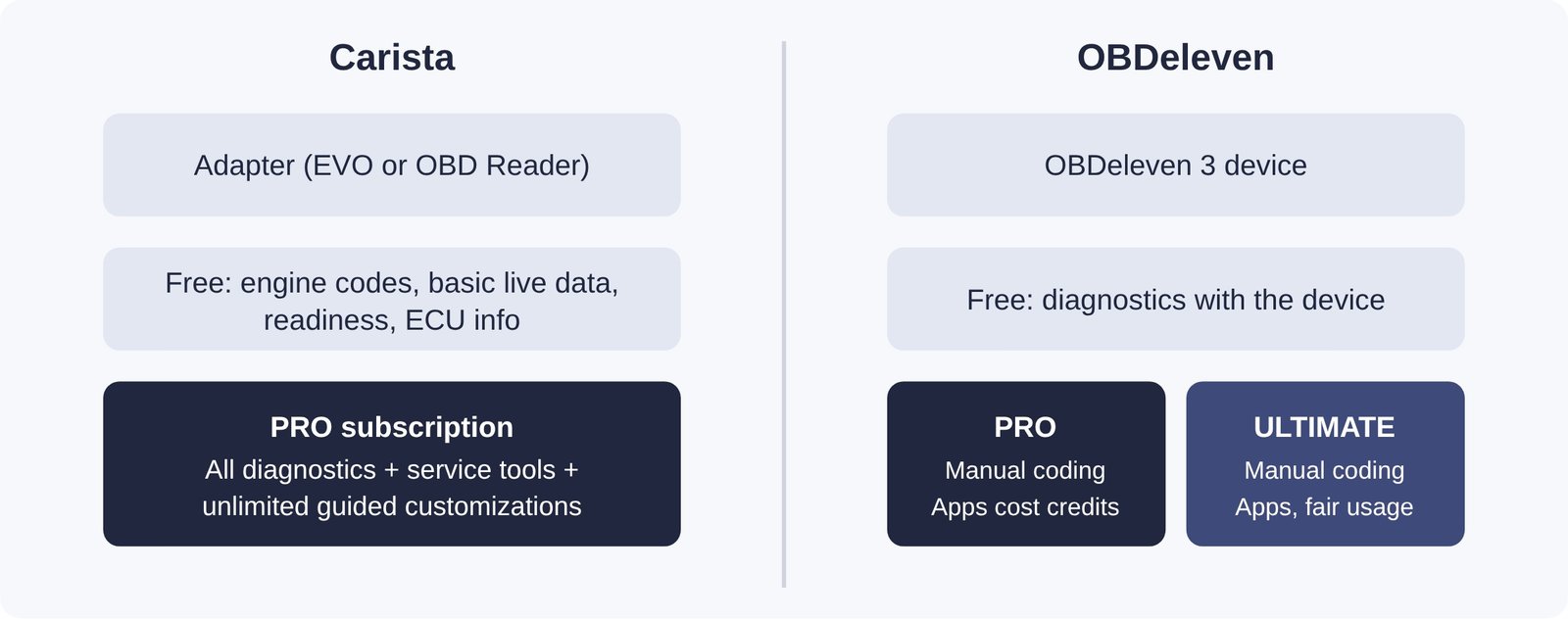
Neither model is wrong. Carista’s is easier to predict: one price, everything included. OBDeleven’s is more flexible and goes further, but you have to work out which plan and how many credits you need.
What You Really Pay Over Two Years
Most people own a coding tool for a couple of years, so a two-year view is more honest than comparing the price of the device alone. These are the prices each brand lists on its own website. Carista’s figures are from its UK store in pounds; OBDeleven publishes its plan prices in euros.
| Item | Carista | OBDeleven |
|---|---|---|
| Adapter | EVO £49.99 (OBD Reader £29.99) | OBDeleven 3, just under $100 |
| Entry paid plan, 12 months | PRO £59.99 | PRO €59.99 |
| Entry paid plan, 24 months | PRO £99.99 | PRO €109.99 |
| Top plan, 24 months | PRO is the only tier | ULTIMATE €329.99 |
| Pre-built tweaks | Included in PRO, unlimited | Credits on PRO (10 for €2.99, 500 for €74.99); included on ULTIMATE |
| Monthly option | Yes, £14.99 / month | Not listed (12, 24, 36 months) |
| Bundle | EVO + 12 months PRO £99.99 | PRO Pack under $200; Ultimate Pack under $300 |
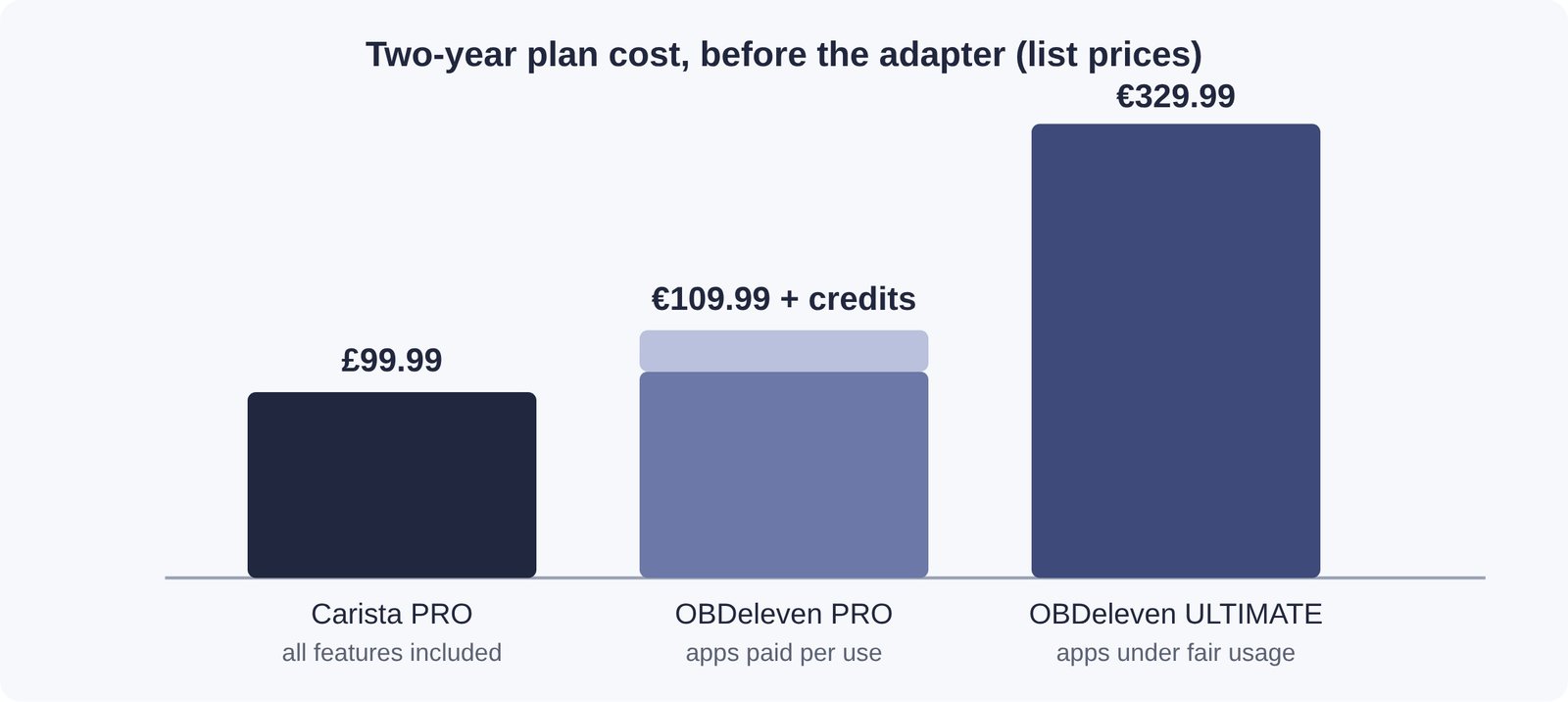
A pound is worth more than a euro, so Carista PRO and OBDeleven PRO end up roughly level on plan price over two years. The gap opens in two places. First, OBDeleven’s adapter costs about twice as much as the Carista EVO. Second, on OBDeleven PRO, every One-Click App you run spends credits. If you only plan to use manual coding, that does not matter. If you mainly want point-and-click tweaks, you either keep buying credits or move up to ULTIMATE, which costs roughly three times as much as PRO.
Carista also offers a monthly plan, which OBDeleven does not list. That is genuinely useful if you only want to make a batch of changes once. Subscribe for a month, do your tweaks and service jobs, and cancel. Carista says changes you have made stay in the car.
Using code LEE15 on Carista’s store takes another 15% off, which widens the gap further.
See Carista bundles, 15% off with LEE15
Hardware: EVO vs OBDeleven 3
| Spec | Carista EVO | OBDeleven 3 |
|---|---|---|
| Connection | Bluetooth 5.1 | Bluetooth |
| Bus support | MS-CAN, SW-CAN, K-Line | 5× CAN-FD |
| Leave plugged in | Sleep mode | Sleep mode, designed for 24/7 |
| Works with other OBD2 apps | Yes (ELM327 v2.2 and ELM329 compatible) | Built for the OBDeleven app |
| Phones | iOS and Android | iOS and Android |
| Warranty | 2 years | See below |
Two practical points stand out. The Carista EVO works as a standard ELM327-style adapter, so you can also use it with third-party apps such as Torque or Car Scanner. That makes it useful even after a subscription ends. OBDeleven 3’s CAN-FD support matters on newer cars that use the faster CAN-FD network, which is part of why OBDeleven can reach some modern platforms.
On warranty, Carista’s own comparison chart says its hardware carries 2 years while OBDeleven offers 14 days. That is Carista’s claim about a competitor, so check OBDeleven’s current warranty terms in your country before relying on it. In the EU, statutory consumer rights may also apply regardless of what a brand offers.
Diagnostics: What You Get Without Paying a Subscription
This is where people get caught out, so it is worth being precise.
Carista free: read and clear generic engine (OBD2) fault codes, basic live data, emissions readiness, ECU information and an acceleration test. That covers the classic “why is my check engine light on” job. Anything beyond the engine, such as an ABS, airbag or TPMS warning, and manufacturer-specific codes, needs PRO.
OBDeleven free: OBDeleven says diagnostics come with the device on supported cars, so you can scan control modules and read faults without a plan. Coding, adaptations and One-Click Apps are where the paid plans come in.
So if your main goal is reading faults across every module and you rarely plan to code, OBDeleven’s free diagnostics are more generous on the brands it supports. The flip side is that you pay roughly double up front for the device. If you need diagnostics and service resets on a car OBDeleven does not fully support, Carista PRO is the route.
Our guide to resetting the check engine light explains when clearing a code is safe and when it just hides a problem.
Customization Depth: Toggles, One-Click Apps and Long Coding
“Coding” means three different things depending on who is talking. Here is how deep each tool lets you go.
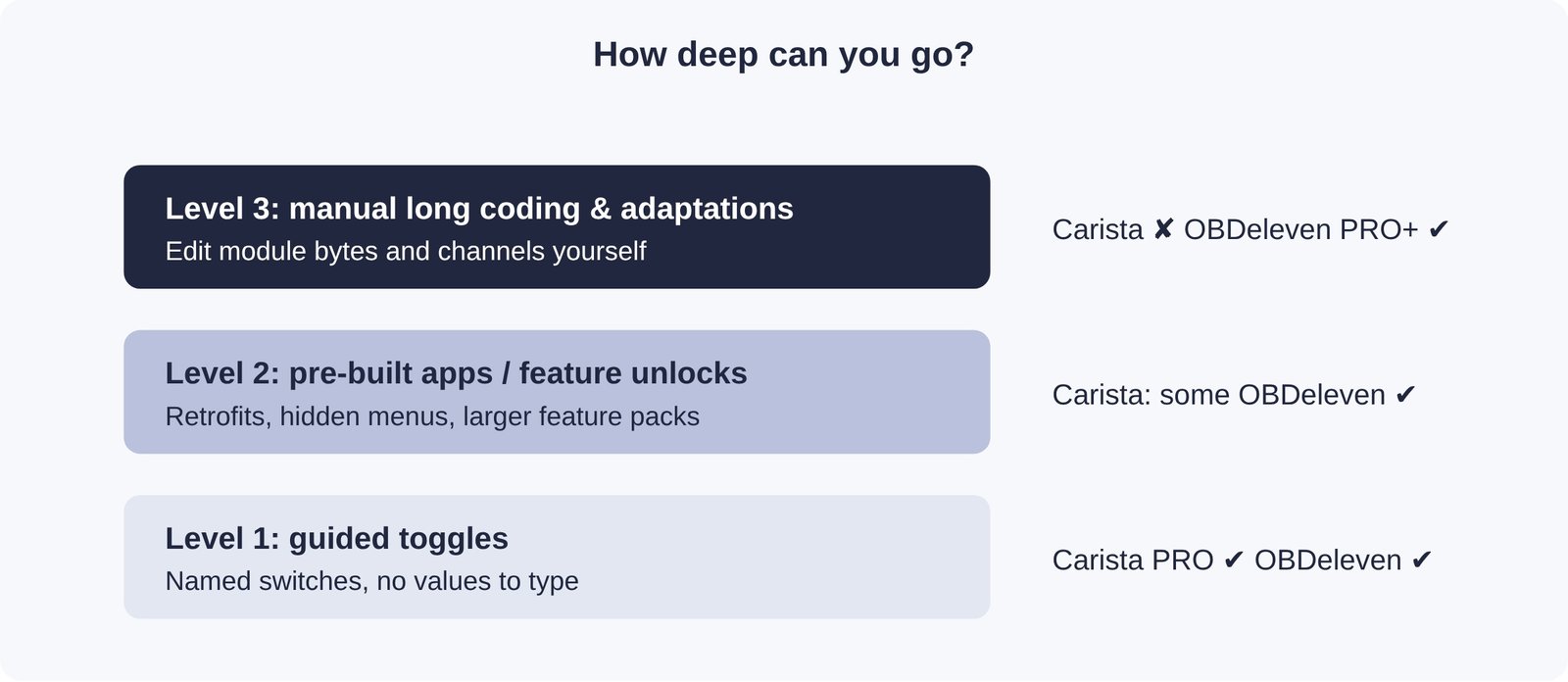
Level 1, guided toggles, is where most owners live: disabling start-stop by default, changing seatbelt chimes, enabling comfort windows on the key fob, adjusting daytime running lights, needle sweep, lap timers, and similar. Both tools handle these on supported cars. Carista’s list is presented car by car, so you only see what your car allows.
Level 2, bigger feature unlocks and retrofit support, is where OBDeleven’s One-Click App catalogue is strongest on VAG cars. It includes things like activating features after fitting retrofit hardware. Carista covers some of these, but not as broadly.
Level 3, manual long coding and adaptations, is OBDeleven territory. Carista does not offer manual long coding, and it does not run bi-directional tests (commanding a component to move so you can check it). If you follow forum guides that tell you to “go to module 09, byte 17, bit 3”, you need OBDeleven, VCDS or a similar tool. Carista is the wrong product for that work.
Be honest with yourself about which level you need. Many buyers pay for level 3 and only ever use level 1.
If You Drive a VW, Audi, Skoda or SEAT
This is OBDeleven’s home ground, and it shows. The tool started as a VAG product and says it is officially licensed by the Volkswagen Group. Owners on Audi forums such as Audizine generally describe OBDeleven as the deeper tool for VAG cars, particularly for manual coding and for more involved changes.
One VAG-specific issue to know about is component protection on newer cars, often called SFD (Schutz gegen Fahrzeugdiagnose). It locks certain modules against changes until they are unlocked. Carista says it can unlock SFD on VW models up to model year 2023, and it announced SFD2 customization support for 2026. If you have a newer VAG car, check which tool currently handles your platform before you buy, because this area changes quickly.
When is Carista still the better pick on a VAG car? When you want a short list of popular tweaks plus service jobs such as oil reset, battery registration and electronic parking brake service, without credits. It also wins if there is another brand of car in the household. Many VAG owners who are not hobby coders are perfectly happy with it.
BMW, Toyota, Ford and Everyone Else
Outside the VW Group, the picture is closer than the forums suggest.
- BMW and MINI: both tools support them. OBDeleven says it is licensed by BMW. Carista has supported BMW for years with service functions and customizations. Check the exact chassis in both apps’ checkers.
- Toyota and Lexus: Carista has long been popular with Toyota owners for comfort tweaks such as lock and unlock behaviour. OBDeleven says it is licensed by Toyota too. Toyota truck and SUV owners on forums such as 4Runner6G use both.
- Ford: OBDeleven’s Ford support is limited to US models. Outside the US, look at Carista’s checker.
- Mercedes: OBDeleven lists 2023 and newer Mercedes as unsupported.
- Other brands: Carista’s comparison chart says OBDeleven fully supports around 14 brands. That is Carista’s count, so treat it as a rough guide. Carista’s real advantage is breadth plus one subscription for all of them.
If you own two or three cars from different makers, that breadth matters. With Carista, the same adapter and app work across all of its supported brands, so you are not buying a second tool for a partner’s car. Check Carista’s current subscription terms for how many vehicles one plan covers.
Get 15% off Carista with code LEE15
Ease of Use and the Risk of Breaking Something
Coding writes data to your car’s control modules, so mistakes have consequences. A bad manual long-coding change can turn on warning lights, disable a feature, or leave a module behaving strangely until it is put back.
Carista reduces that risk by limiting you to a curated menu. You cannot type a wrong byte because you never see one. Carista describes its customizations as fully reversible. The trade-off is that you can only do what Carista has built.
OBDeleven gives you more freedom and the risk that comes with it. One-Click Apps are about as safe as Carista’s toggles. Manual coding assumes you know what you are doing or are following a reliable guide. Beginners do get into trouble when they copy coding values meant for a different model.
Whichever tool you use, a few habits prevent most problems:
- Keep the battery healthy. Use a battery maintainer for long sessions, because low voltage during a write is a classic cause of failures.
- Note or screenshot the original value before you change anything.
- Change one thing at a time and test it before moving on.
- Do not code while the car is moving, and keep the phone close to the adapter so the Bluetooth link stays stable.
What Owners Say on the Forums
Reading through owner threads on Audizine and Toyota 4Runner forums, the same themes keep coming up:
- For OBDeleven: owners describe it as more powerful on VAG cars, like the convenience of One-Click Apps, and value manual coding. Enthusiasts who retrofit parts tend to land here.
- Against OBDeleven: frustration with the credits model, and with costs adding up once you combine a device, a plan and credits.
- For Carista: owners call it the easier of the two, like its wider brand coverage, and like being able to subscribe for a month and cancel.
- Against Carista: no manual coding, a shorter tweak list on some VAG models, and a dislike of subscriptions in general.
On the Carista store itself, the brand shows an average of 4.9 out of 5 from more than 8,300 reviews, and the EVO adapter’s own product page shows 4.71 from 156 reviews. Store reviews skew positive on any brand’s own site, so weigh them alongside forum opinions rather than instead of them.
Pick in Under a Minute
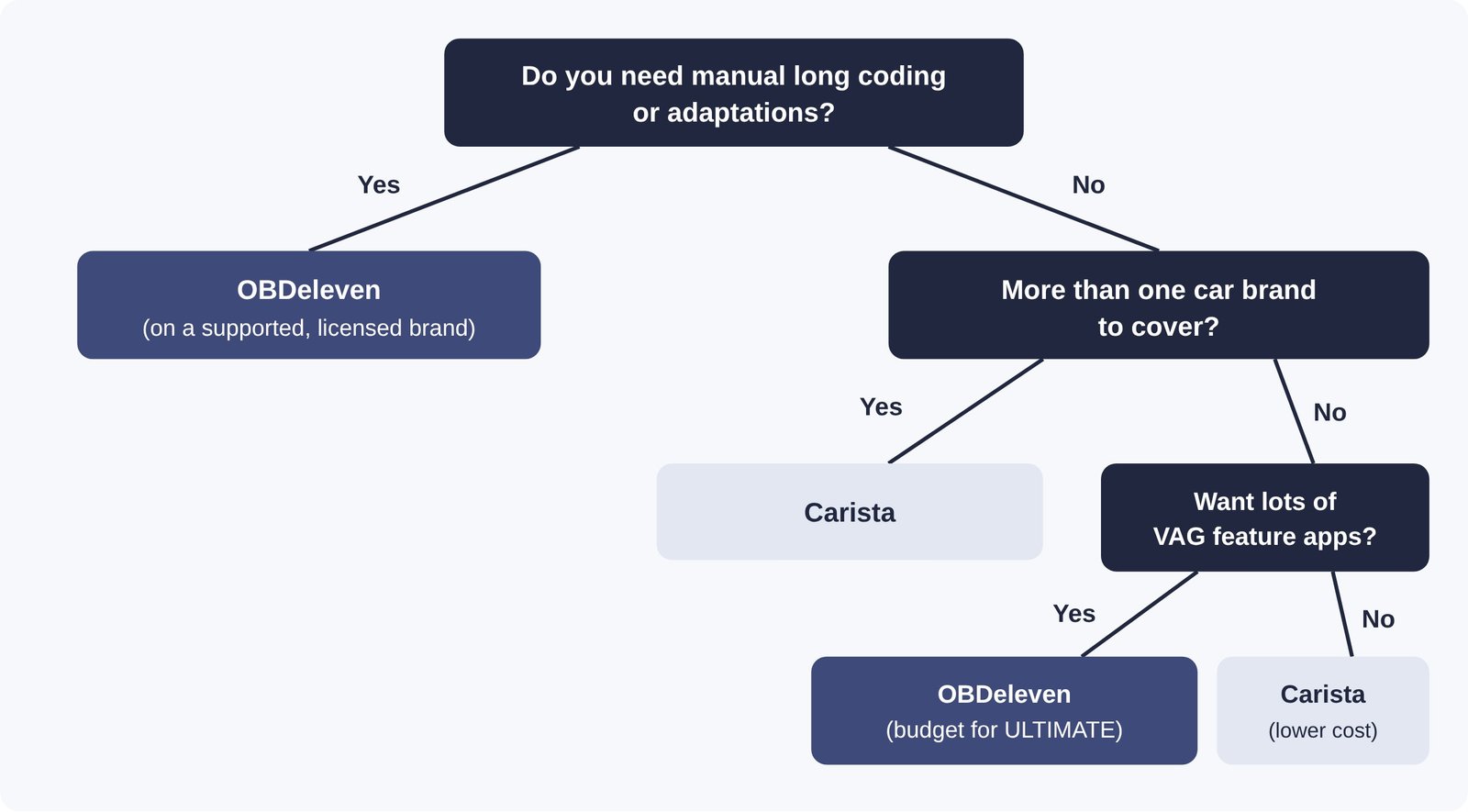
In plain words: if you will genuinely use manual coding on a car OBDeleven is licensed for, buy OBDeleven. If you want the popular tweaks, full diagnostics and service resets for the lowest predictable price, especially across more than one brand, Carista is the more sensible buy. If you are unsure, start with Carista. The EVO keeps working as a regular OBD2 adapter with other apps, so it does not become a paperweight if you move to something else later.
How to Get Carista for Less
If Carista fits your car, buy it from the official store rather than a marketplace reseller. That way you get the 2-year hardware warranty, the 30-day money-back guarantee and free shipping. The steps are simple:
- Run your car through Carista’s compatibility checker to see which features your model supports.
- Choose your option. The EVO + 12 months PRO bundle is the best value if you want customizations and service tools. The EVO alone works for free code reading.
- At checkout, enter LEE15 to take 15% off your order.
- Install the Carista app, plug the EVO into your car’s OBD2 port with the ignition on, and pair it in the app.
For a closer look at the app itself, including the full free vs PRO feature list, read our full Carista review.
Sources: Carista official store and product pages; Carista blog, “Carista vs OBDeleven: simplifying your choice”; OBDeleven, “OBDeleven vs Carista” and plan pricing pages; OBD Advisor, “OBDeleven PRO vs ULTIMATE”; owner discussions on Audizine and 4Runner6G forums. Competitor figures quoted from Carista’s materials are attributed as such.